Munich University Campus – Multi‑Layer Feature Extraction (Point, Polyline, Polygon)
Location: Munich, Germany (University Campus area)
Project Overview
Nazru’s AI platform was deployed around the Munich University campus to perform a comprehensive, multi‑layer extraction of all visible features. This project delivered point, polyline, and polygon layers covering over 150 distinct classes, including building roof elements, vehicles, urban objects, road surface damages, lane markings, network links, surface materials, and surface types. The result is a complete digital twin‑ready dataset of the campus and its surroundings.
The Challenge
The university campus required a highly detailed, geospatially accurate map for asset management, safety analysis, autonomous navigation, and urban planning. No single automated solution existed to simultaneously extract:
Point features
Polyline features
Polygon features
Manual digitisation was impossible at scale. The client needed an integrated AI‑powered workflow to extract all feature types from high‑resolution aerial and satellite imagery.
The Nazru Solution
Nazru’s platform integrated high‑resolution aerial imagery, satellite imagery, and optional mobile mapping data with a suite of deep learning models tailored to each geometry type. Our algorithms automatically extracted and classified the following:
Point Layer (12 classes)
Detected as individual points with sub‑metre accuracy:
Group | Classes |
|---|---|
| Pedestrians | pedestrian |
| Poles & posts | pole, signpost, delineator, street‑light‑post, bollard, traffic‑signal‑post, camera‑pole, watch‑pole |
| Information screens | info-screen |
| Vegetation | bush, tree |
Polyline Layer (27 classes)
Group | Classes |
|---|---|
| Surface boundaries | sidewalk‑nonsidewalk, road‑sidewalk, road‑nonroad |
| Elevated roads | elevated‑road‑on‑water, elevated‑road‑on‑land |
| Roadside infrastructure (linear) | guardrail, fence, jersey‑barrier, curb‑edge, lawn‑edge, abyss |
| Poles & posts (as linear alignments) | traffic‑signal‑post, bollard, street‑light‑post, gate, pole, signpost |
| Information screens (as linear edge) | info‑screen |
| Road (Network) ways | way‑vehicle, way‑bikeway, way‑railroad, way‑restricted |
| Road (Network) links | link‑vehicle, link‑bikeway, link‑railroad, link‑restricted |
| Road axis | road‑axis (with attribute: direction = one‑way or two‑way) |
Polygon Layer (133 classes in 8 groups)
Area features (Polygon). Classes grouped by theme.
Group | Classes |
|---|---|
| 1. Roof & Building Elements (26) | chimney, air‑conditioner‑box, window, holes, air‑conditioner‑channels, infrastructure, building, valley, roof‑skylight, vent‑pipe, ridge, rain‑gutter, roof‑opening, dish, wall, table, grid, roof‑tiles, awning, terrace, fence, roof‑element, chair, air‑conditioner‑fan, roof, roof‑fixuture |
| 2. Vehicles (10) | car, bike, motorcycle, truck, trailer, tractor‑unit, bus, boat, vessel, other |
| 3. Urban Objects, Vegetation & Infrastructure (43) | advertising‑pillar, bridge, building, shrub, median‑strip, noise‑barrier, tree, tree‑group, tunnel‑entry, utility‑box, subway‑entrance‑exit, grass, lawn, construction‑site, conex‑box, trash‑container, wall, bench, fan, clutter, street‑light, traffic‑signal‑box, table, chair, sign‑post, scaffolding, water, stairs, person, awning, swimming‑pool, unidentified‑object, fence, bollard, curb‑edge, curb‑stone, gravel, parking‑meter, pipe, pole, roof‑tiles, schrub, skylight |
| 4. Road Infrastructure (6) | manhole, drainer, patch, seam, crack, jersey‑barrier |
| 5. Lane Markings as Polygon (27) | single‑long‑line, connect‑stop‑line, dashed‑line, small‑dashed‑line, stop‑line, restricted‑area, crosswalk, parking‑zone, no‑parking‑zone, straight‑arrow, turnright, turnleft, straight‑turnright, straight‑turnleft, turnright‑turnleft, turnright‑straight‑turnleft, slight‑turnright, text‑number, symbol, box, waiting‑line, temporary‑cancelled, double‑long‑line, double‑turnright, double‑turnleft, others, lane‑marking‑units |
| 6. Lane Area (Network as Polygon) (8) | way‑vehicle, link‑vehicle, link‑bikeway, way‑bikeway, way‑railroad, link‑railroad, way‑restricted, link‑restricted |
| 7. Road Surface Material (4) | asphalt, concrete, cobblestone, road‑units |
| 8. Pavement & Ground Surfaces (9) | sidewalk, bikeway, accessway, impervious‑surface, footway, parking‑place, entrance‑exit, ground, way‑units |
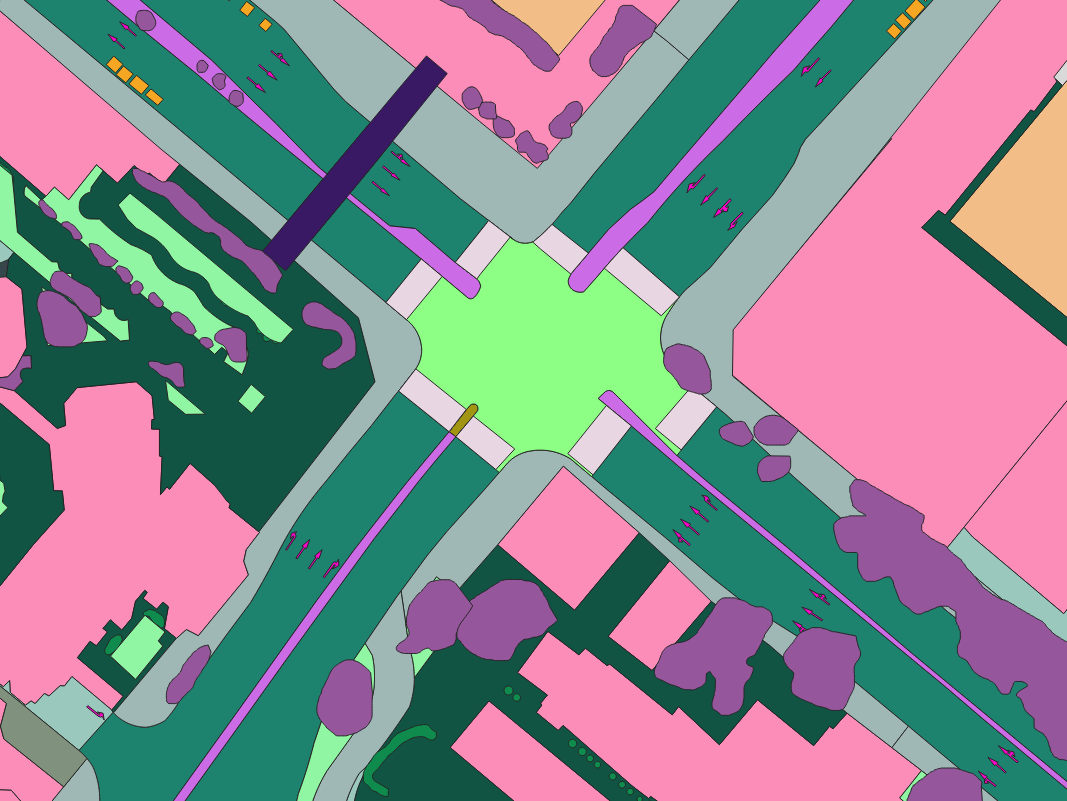
Sample image of the Munich University campus area, Germany – AI‑based multi‑layer feature extraction (point, polyline, polygon).
Key Results & Benefits
Comprehensive multi‑layer dataset – Over 170 distinct feature classes delivered as point, polyline, and polygon layers, covering pedestrians, poles, vegetation, road axes, lane markings, network links, building roof elements, vehicles, urban furniture, road infrastructure, lane areas, road surface materials, and pavement surfaces.
High‑accuracy geolocation – All features extracted with sub‑metre precision from high‑resolution aerial and satellite imagery.
Ready‑to‑use GIS outputs – Shapefile, GeoJSON, KML, and CSV formats provided for immediate integration into asset management, digital twin, and navigation systems.
Clear separation of geometry types – Point layer for discrete objects, polyline layer for linear features (including road axis with one‑way/two‑way direction), polygon layer for area‑based features (roofs, vehicles, surfaces, lane markings as polygons).
Automated, scalable workflow – Eliminates manual digitisation; enables regular updates for the entire campus area.
Supports multiple applications – Asset inventory, road maintenance (cracks, patches, manholes), autonomous navigation (lane markings, network links), urban planning (surface materials, building elements), and environmental monitoring (trees, grass, water).
Key Technologies Used
AI‑based object detection – For point features (pedestrians, poles, trees, bollards, cameras, info‑screens).
AI‑based semantic segmentation & vectorisation – For polyline features (surface boundaries, elevated roads, guardrails, fences, jersey barriers, curb edges, network ways/links, road axis) and polygon features (building roof elements, vehicles, urban objects, road infrastructure, lane markings as polygons, lane areas, road surface materials, pavement surfaces).
Multi‑task deep learning – Simultaneous extraction of point, polyline, and polygon geometries from single imagery sources.
Rule‑based attribute assignment – Direction attribute (one‑way / two‑way) for road axis polylines.
Panchromatic and multispectral fusion – Enhances spatial detail for sub‑metre accuracy.
Geospatial post‑processing – Conversion of raster segmentation masks to clean vector geometries (points, linestrings, polygons) with topological consistency.
Output Formats (by layer)
Point layer: Shapefile, GeoJSON, KML, CSV
Polyline layer: Shapefile, GeoJSON, KML
Polygon layer: Shapefile, GeoJSON, KML